- Client
- Apex Industrial Supply (demonstration build)
- Industry
- B2B industrial equipment distribution
- Services
- Discovery & requirements, Flow Orchestration, Custom Metadata configuration, Reporting
- Discounts route to the right approver automatically
- Approval thresholds tunable by an admin, no code
- Full audit trail on every request
Apex Industrial Supply is a fictional B2B distributor of industrial equipment. We built this engagement end to end to show how we work: how we take a messy, real-world process and turn it into something governed and fast. Everything below is real configuration in a real org. Only the company is invented.
The brief was a discount approval system that runs itself. No email chains, no deals sitting in someone’s inbox, and no custom code for the admin to babysit later.
The challenge
Reps at a distributor negotiate discounts all day. The trouble is what happens after they agree to one. At Apex, a discount went out for approval over email, bounced between managers, and often sat for days while everyone worked out who actually had the authority to sign off.
Two things were quietly hurting the business. Margin erosion was invisible: nobody could see, in one place, how much discount was being given away or by whom. And good deals stalled, because the approval never reached the right person fast enough.
They needed a system that knew the rules. Small discounts wave through, bigger ones go up the chain, and every request is on the record.
The approach
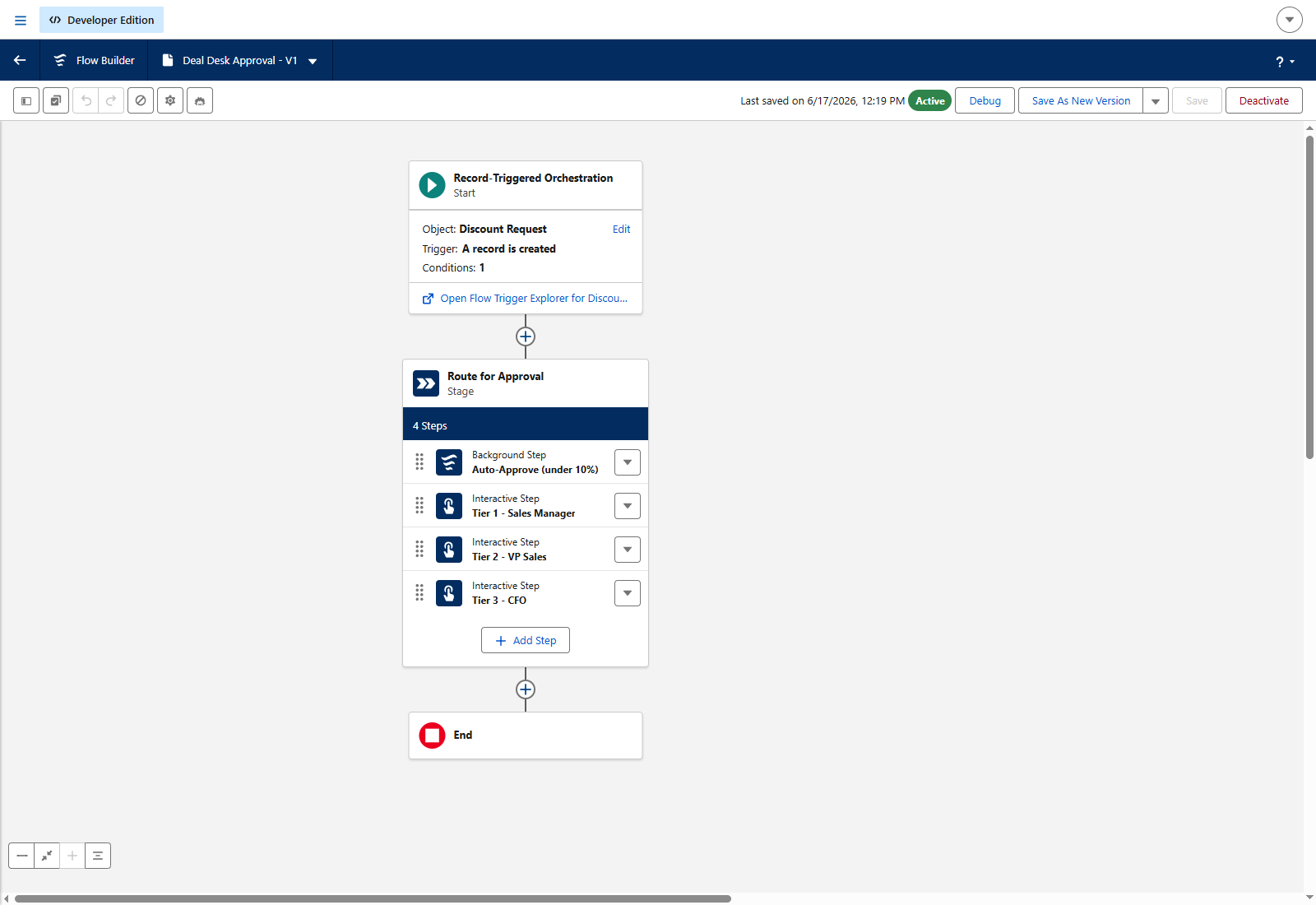
We mapped the discount policy first, in plain numbers. Under 10% is routine and can clear itself. 10 to 20% is a Sales Manager call. 20 to 30% goes to the VP of Sales. Anything above 30% is the CFO’s decision.
Then we built the engine with Flow Orchestration, which is Salesforce’s modern way to run an approval across several people. The whole thing is declarative. No custom code touches the delivered solution.
The rule we set with ourselves: keep the policy out of the flow. The thresholds, the SLA hours, and the discount ceilings all live in Custom Metadata, so an admin can re-tune the entire engine from Setup without opening the orchestration. When the business changes its policy, the system changes with a couple of edits, not a developer ticket.
What we built
A request anyone can raise in seconds. A rep opens the deal, enters the discount they want, the product line, the customer segment, and a short justification. That is the whole submission.
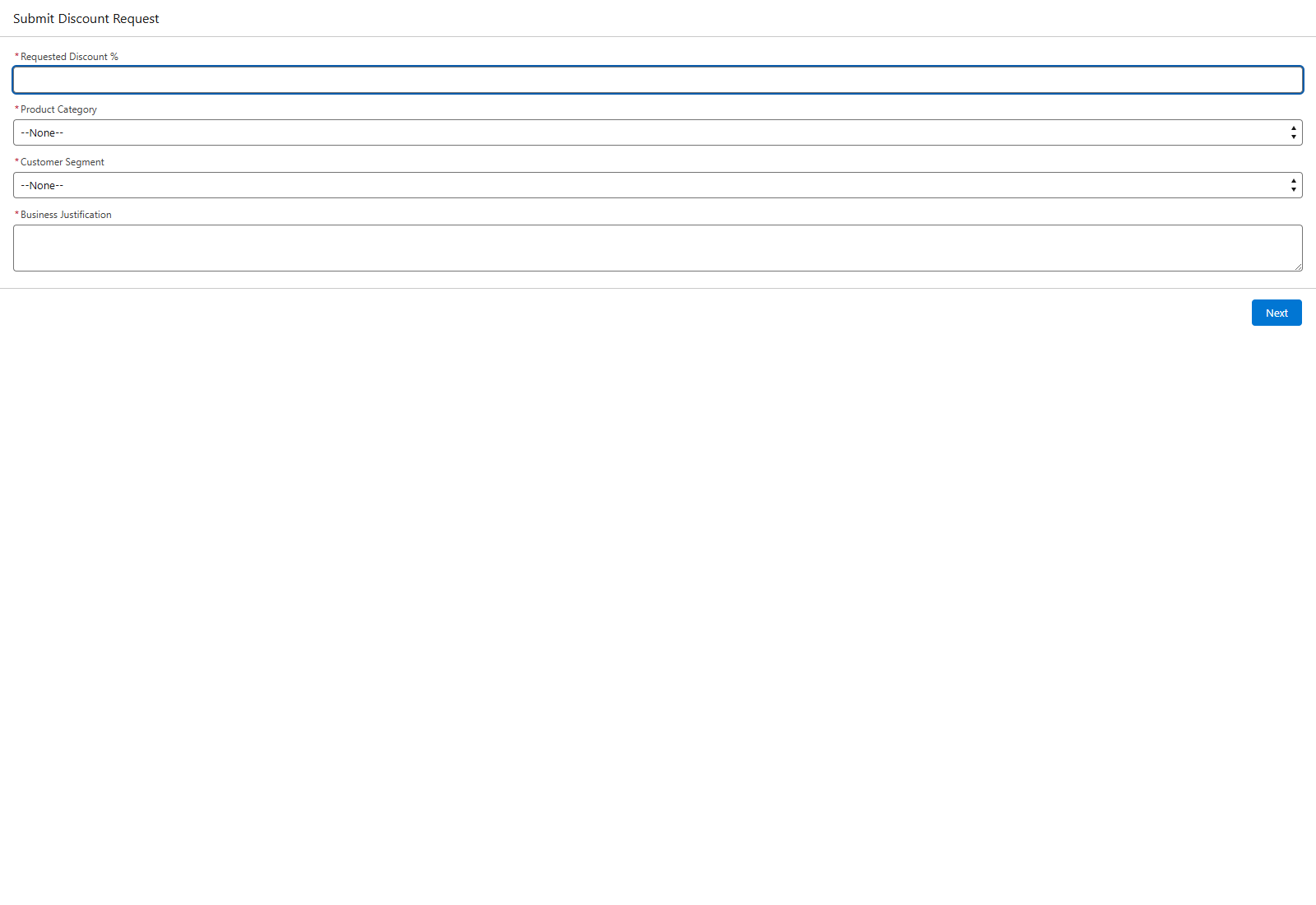
An engine that routes by size. The moment a request comes in, the orchestration reads the discount and sends it down the right path. Under 10% is auto-approved in the background with no human touch. Everything else becomes a work item for the right approver, who acts on it right there on the record.
Guardrails built from policy, not code. A reusable subflow checks each request against a discount ceiling for that product and customer segment, so a rep can see before they submit whether the discount is even allowed. The thresholds and ceilings sit in Custom Metadata, ready for an admin to adjust.
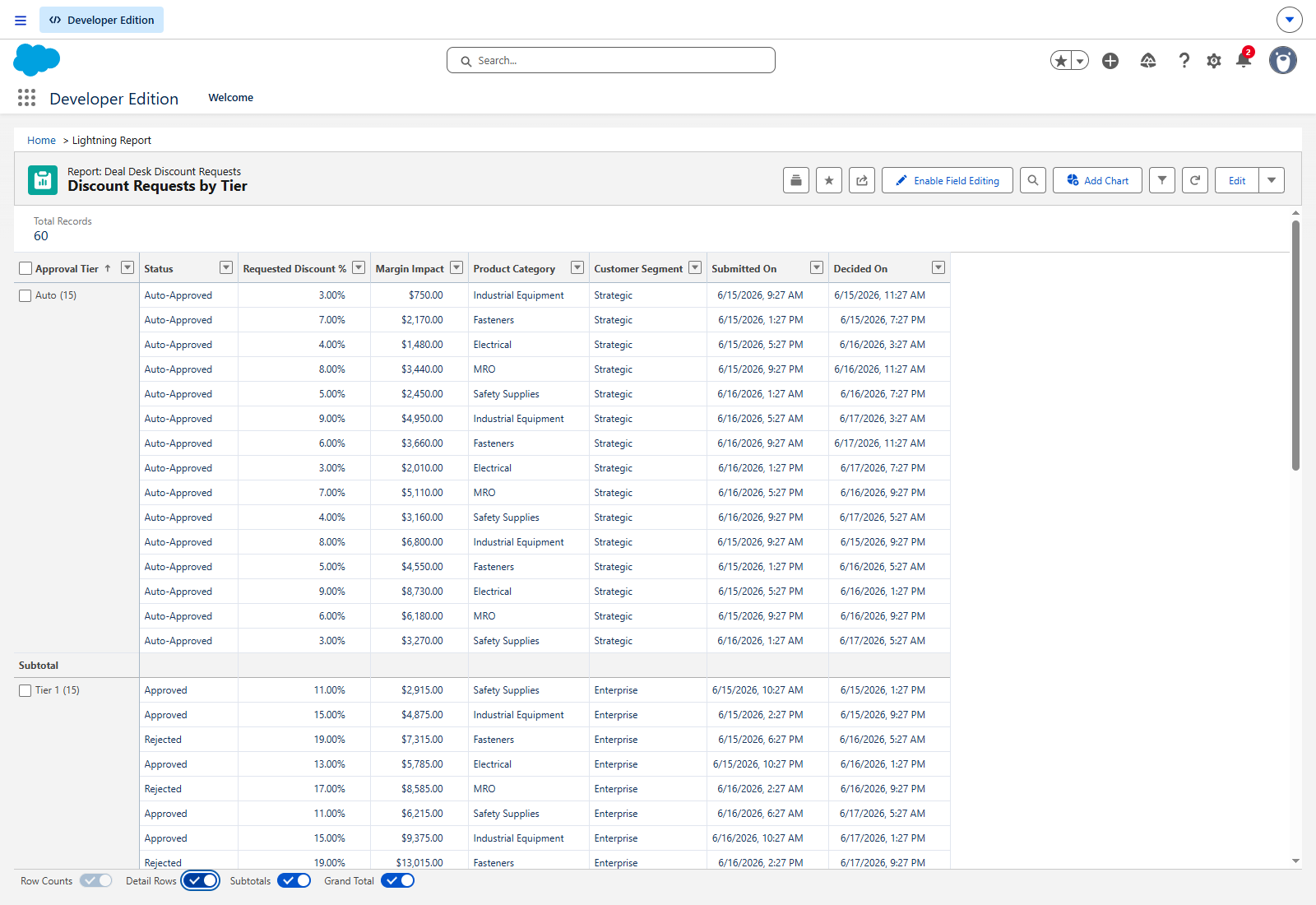
A full audit trail. Every request becomes a record: who asked, how much, the justification, who decided, when, and why. Nothing lives in an inbox where it can’t be found later.
Approvals that don’t stall. A scheduled job checks daily for requests sitting past their SLA and escalates them, so a deal never dies waiting on a slow approver.
Roles that match the org. Permission Set Groups give each role exactly what it needs. Reps raise requests, managers and VPs approve their tier, and only the Deal Desk analyst can see the margin numbers.
How it runs
A rep submits a discount request from the opportunity. The engine reads the size and routes it.
Under 10% clears itself. Anything higher lands with the right approver as a work item, with the request details and justification right in front of them. They approve or reject, and the decision, the approver, and the timestamp are all written back to the record.
Leadership doesn’t have to ask for any of this. The reporting shows discount activity by tier, approvals versus rejections, turnaround time, and the margin impact of every discount granted.
The result
A discount process that enforces the policy on its own, routes deals to the right person in seconds, and gives leadership a view of margin they never had before. The thresholds are the admin’s to change, not a developer’s.
To prove it under load, we seeded the org with 60 discount requests spread across all four approval lanes, from auto-approved up to CFO-level deals. The reports run on real volume, and the engine routes every one of them correctly.
This is the kind of process work we bring to every engagement: take something that lives in email and turn it into a system the business can trust and an admin can own. If your approvals look like this today, let’s talk.